
Siril is a free open source astrophotography processing tool that supports Windows, Linux and Mac.
It is a very powerful tool that has many community made scripts to enhance the functionality, the stacking process however isn’t as quite straightforward as some other tools.
This tutorial will show you how to do some basic stacking with an OSC (One Shot Colour) camera, whether that’s a dedicated astronomy camera or a DSLR, the mono process is quite similar so you may still find this tutorial of use.
File Layout
Siril expects your image files to be in a specific folder layout, there needs to be a folder for:
- lights
- darks
- biases
- flats
Calibration Frames
To get the best results you need to use calibration frames.
Lights
Lights are the images you take of your object, ideally the exposure time and gain / ISO should be the same for all of them, typical exposures range from 10 seconds to 5 minutes.
Preferably you want exposures long enough to start revealing detail but not so long that errors in tracking or guiding become visible; Longer exposure also have a higher risk of being ruined by passing aircraft, satellites or guiding / tracking errors.
Darks
Dark frames are pictures taken with no external light, so you would put your lens cap on or your telescope cap so the camera sensor is in complete darkness.
Dark frames are used to compensate for thermal noise, as such the temperature of your dark frames ideally should be close to that of your light frames, you will also need to use the same exposure length and gain / ISO as your light frames.
Darks are reusable practically indefinitely (for the same camera) so it’s a good idea to make a library of them, you should aim to have at least twenty or even better up to 50% of your light frames.
Cooled astronomy cameras may not need to use any dark frames, so it’s worth experimenting and seeing what looks best, DSLR cameras will almost certainly require them.
Beware that cameras without cooling will heat up during use so your sensor temperature may be several degrees hotter than ambient.
Flats
Flat frames are used to compensate for dust and dirt in the optical path as well as removing vignetting, a lack of, or poor quality flat frames will often ruin your data, so these are by far the most important.
Flat frames are taken by pointing your lens or telescope at something evenly illuminated, this can be the sky or as is normally recommended a purpose made LCD flat panel, preferably with adjustable brightness, the exposure needs to be set to move the histogram roughly half way to the right.
Flat frames must be taken again any time there is a change to the optical path, such as changing a filter1 or rotating your camera, they can be reused for a number of sessions but the longer you leave it the higher the risk your will begin to see new dust appearing, as such try avoid reusing them for more than two to three sessions, the gain / ISO should be the same as your light frames, ten of them is usually sufficient.
- If you’re using a filter wheel or drawer you may be able to ignore this, although a drawer carries a high risk of dust exposure ↩︎
Dark Flats
Dark flats, or flat darks, however you want to call them are dark frames that match the same exposure and gain / ISO as your flat frames.
There is some debate as to whether they are needed or not, in my own testing I’ve found they do not help, they should not be needed as long as your exposure length for your flats is below a few seconds, even with a relatively high noise DSLR, if you want to use them these will replace your biases.
Biases
These are dark frames taken at the fastest shutter speed of your camera, with the same gain / ISO as your lights, these are used to compensate for offset.
Synthetic bias is another option since the offset of many cameras is fixed, most DSLR’s have an offset of 2048.
Stacking
Stacking in Siril can be done manually by using the conversion, sequence, calibration, registration and stacking tabs, however this is time consuming and rather cumbersome.
A better option is to use a script, Siril comes with a number of useful scripts built-in, the one you will most often want is the OSC_Preprocessing script, I recommend right clicking on it so you can see exactly what it does, the basic workflow is:
- Convert bias frames to .fit files and turn them into a sequence
- Stack bias frames with no normalisation to create a maser bias
- Convert flat frames to .fit files and turn them into a sequence
- Calibrate flat frames with the bias frames
- Stack flat frames with multiplicative normalisation to create a master flat
- Convert dark frames to .fit files and turn them into a sequence
- Stack dark frames with no normalisation to create a master dark
- Convert light frames to .fit files and turn them into a sequence
- Calibrate light frames with flats and darks
- Align (register) the calibrated light frames
- Stack light frames with additive scaling normalisation
- Flip result if needed and save
As you can see this is a number of steps to do manually, but you can if you really want to, if you have specific needs you can write your own script, Siril has an extensive list of commands that you can use to automate your workflow which is what makes Siril such a powerful tool.
Before running the script you need to make sure the Siril home is set to where your frames are located by clicking the home button in the top left corner.

Once that is done you can run the script and wait for it to complete.
OSC duo-band extraction
If you’re using a duo-band filter such as Ha / OIII or SII / OIII you may want to extract the individual bands, this can be done very easily with the included OSC_Extract_HaOIII script.
This will give you the individual Ha and OIII files, the same scripts works for SII / OIII but you should note that the SII output will be named as Ha.
It’s a good idea to do background extraction and any other basic corrections before compositing.
If you’re doing both filters you will end up with two OIII files, you can stack these together with the following steps.
- Use the sequence tab and add both OIII files, give the sequence a name and click convert
- On the registration tab click ‘Go register’, the default settings should work fine
- On the stacking tab make sure the settings are as shown below
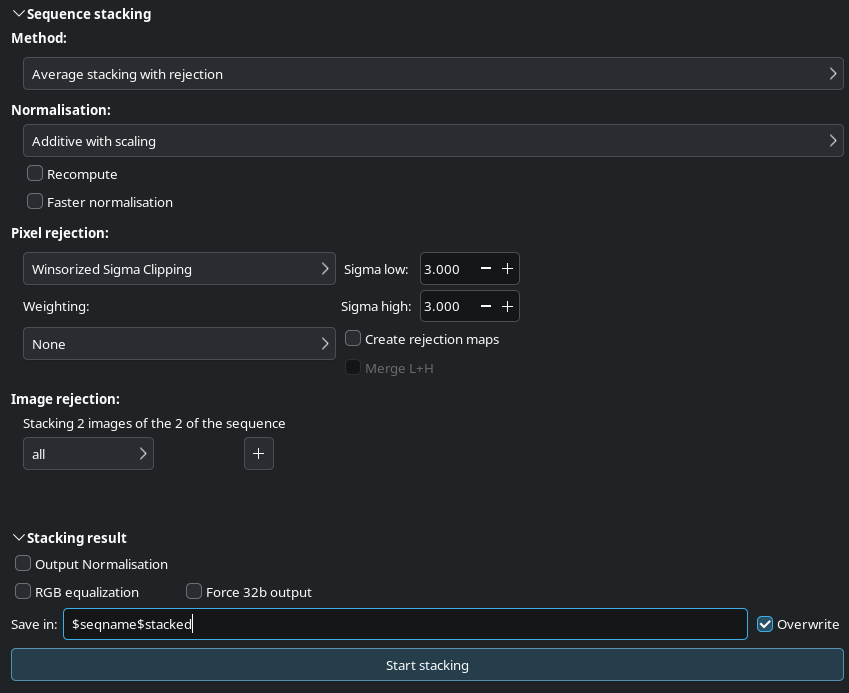
Click ‘Start stacking’, this will stack your two OIII frames into a single frame.
RGB Compositing
To merge your extracted images you can use either pixel math or the RGB compositing tool, the latter is a bit easier to use, if slightly less flexible, it’s important to note that this tool cannot align images that have any rotation between them, so you will likely need to register them.
You do this the same way as we stacked the OIII images, except we stop after the registration step, for a full Ha / SII workflow you will end up with at least three images, Ha, SII and OIII, using luminance is optional.
Due to the way Siril renames sequence files you may get confused as to which one is which, fortunately it generates a (sequence)_conversion.txt file you can look at to see what the original files have been mapped to, your registered files will always start with r_.
Once you have them registered you can use the RGB compositing tool without worrying about any alignment issues.
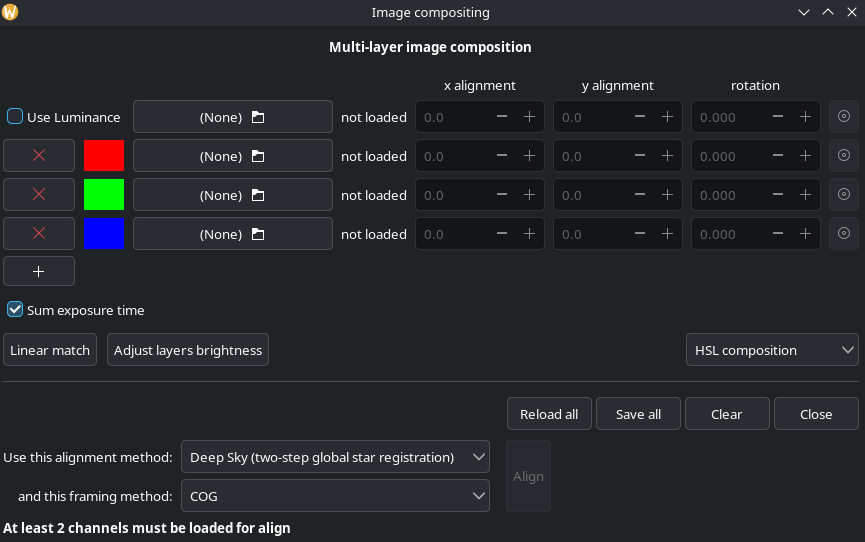
This tool is largely self explanatory, put the images in to the channels however you want, clicking Linear match and Adjust layer brightness should give you what you’re looking for, this tool offers a live preview so play around with it as much as you want.
Advanced stacking scripts
The default stacking is a bit limiting unless you adjust the script or make a new one, it also doesn’t handle multiple session that well, fortunately there are a number of free python scripts that have been made by the Siril community that offer a lot more options and are definitely worth trying. some of the popular ones I have found are:
- Naztronomy OSC_PP (also has a version for mono and smart telescopes)
- AMSP (works great but only accepts fits files)
- Storage Friendly Stacking (supports multiple sessions)
- OSC Multi night stacking (a more advance multi session script)
Of these I personally recommend the Naztronomy script as it’s both easy to use and reasonably powerful.
Conclusion
Hopefully this tutorial will give you enough information to get you started with stacking in Siril.